How to Choose a Phone Case for iPhone or Android: 8 Things to Check
A good phone case needs to fit your exact iPhone or Android model, feel comfortable, and work with your charging habits. Use these eight checks before buying.
1. Confirm your exact phone model
Two phones with similar screen sizes can have different camera bumps, buttons and dimensions. On iPhone, check Settings > General > About; on Android, check Settings > About phone (menu names vary). Match the model to the specific case variant, not just the brand.
2. Pick the case style for your routine
Slim fitted cases add less bulk. Wallet cases offer card pockets, while decorative cases emphasize appearance. If drop protection is important, look for documented testing rather than assuming any particular style is protective.
3. Consider grip and material
Flexible TPU, silicone-like materials, hard plastic and PU-leather-style finishes feel different. Look at thickness, weight and how easily you can hold and remove the case. Material names alone do not establish durability.
4. Check the cutouts and edges
Ensure the camera, flash, speakers, buttons and charging port remain accessible. Raised screen and camera edges may help reduce contact with flat surfaces, but cannot guarantee against damage. If you use a screen protector, confirm the case will not lift its edges.
5. Verify wireless charging compatibility
Thick cases, metal parts and attachments can disrupt wireless charging. Check both your phone and charger instructions. Never leave payment cards or other sensitive objects between the phone and wireless charger. For charging choices, read our USB-C versus wireless charging guide.
6. Distinguish Qi charging from magnetic alignment
A case that allows Qi wireless charging is not necessarily designed for MagSafe or magnetic Qi2 alignment. Check the exact case, phone and charger combination; do not assume a generic magnetic ring means certification.
7. Check wallet-case features
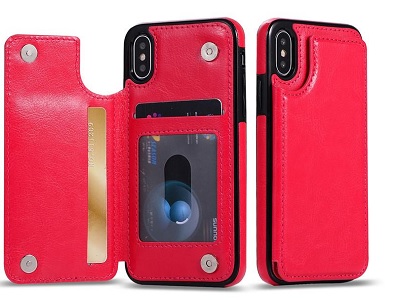
Card slots and stands can be useful, but add thickness. The store’s Wallet Case Luxury Cell Phone Back Case Cover is described with PU-leather-style material and card pockets. Its listing mentions several phone models, so verify the available version for yours before ordering.
8. Read the actual specifications
Claims such as “rugged,” “water-resistant,” or “drop-proof” need supporting specifications or credible test information. The Rhinestone Glitter Phone Case is a decorative option with a listed soft TPU interior; check its model fit rather than assuming universal compatibility.
Quick phone case buying checklist
- Exact phone model and selected case variation
- Camera, button and port openings
- Grip, thickness and weight
- Screen and camera edge coverage
- Wireless or magnetic charging compatibility
- Card-pocket and stand requirements
- Evidence for any protection claims
- Return and product details before checkout
Frequently asked questions
Will one case fit both iPhone and Android?
Usually not as a fitted shell. Some listings offer separate variants for multiple models; select the correct one.
Can I wirelessly charge through a wallet case?
It depends on thickness, materials and the charger. Remove cards and follow the phone and charger manufacturers’ instructions.
Does a stylish case protect against drops?
Appearance does not prove impact performance. Look for construction details and credible test evidence.
Explore the iPhone and Android accessories shop and compare individual listings before selecting your case.