USB-C or Wireless Charging? A Practical Guide for iPhone and Android
Choosing a phone charger should be simple—but USB-C, Power Delivery, MagSafe and Qi2 can make the shopping process confusing. The right choice depends less on the biggest wattage printed on a box and more on your phone, its charging standard, the cable and how you actually use your device.
This practical guide explains what to check before buying an iPhone or Android charger, whether you prefer a cable at your desk or a magnetic pad beside your bed.
1. Start with your phone’s charging port
Look at the connector on your phone before choosing a cable. iPhone 15 and later models use USB-C; many earlier iPhones use Lightning. Many Android phones also use USB-C, but the plug shape alone does not tell you what charging speed the phone supports. Apple’s USB-C charging guidance explains the distinction for compatible iPhones.
For a USB-C iPhone or Android phone, a USB-C-to-USB-C cable may be a convenient everyday option. If you use an older iPhone with Lightning, select the appropriate cable instead of assuming any USB-C cable will fit.
2. Look beyond the wattage number
A charger marked 40W is not a promise that every connected phone will receive 40W. Actual charging power is negotiated between the phone and charger and can depend on the cable, battery level, temperature and supported charging protocols. USB Power Delivery (USB-PD) is an important standard to look for, particularly when shopping for USB-C fast charging.
In fact, the USB Implementers Forum distinguishes the USB-C connector from the USB Power Delivery protocol; a USB-C plug does not by itself guarantee a particular power capability. See the USB-IF’s product guidance for details.
Before you buy: check the manufacturer’s charging recommendations for your exact phone model, then compare them with the charger’s stated output and protocol support. Apple provides model-specific fast-charging advice in its iPhone fast-charging support guide.
3. One charger or two ports?
A single-port charger is a straightforward choice if you usually charge one phone. A dual-port charger can be more practical for a phone and earbuds, or for two phones on a shared desk. The important detail is how power is distributed when both ports are in use: the total advertised rating may be shared rather than supplied independently to each device.
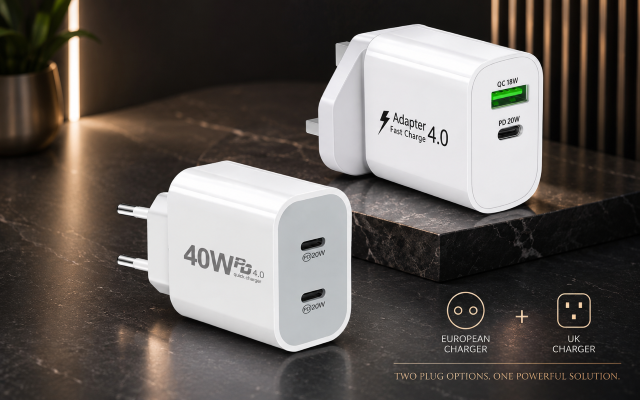
For example, our 40W European USB-C dual-port charger is listed with two USB-C ports and a European plug design. If you need a particular charging speed with two devices connected, check its port-output specifications and your device requirements before ordering.
4. When is wireless charging the better choice?
Wireless charging is convenient when you repeatedly pick up and put down your phone. A charging pad can keep a bedside table or workspace tidy and reduce repeated plugging and unplugging. A cable remains a useful option when you want to use your phone while it is charging or need to avoid interruptions caused by poor pad alignment.
Qi2 is a wireless-charging standard associated with magnetic alignment on compatible devices and accessories. However, support varies by phone model, case and charger: a phone with USB-C is not automatically Qi2-compatible. If magnetic alignment matters to you, check both your phone and its case before you buy.
Our Belkin Qi2 magnetic wireless charger is listed as MagSafe-compatible, with a built-in kickstand and a stated wireless output of up to 15W. The actual charging speed depends on the connected device and setup, so confirm model compatibility rather than relying on the maximum number alone.
5. The cable is part of the charging system
Even a good power adapter cannot compensate for the wrong connector or an unsuitable cable. For everyday phone charging, look for the correct ends, clear compatibility information, adequate power support and a cable length that suits where you charge. If you also move large files between devices, check data-transfer specifications separately—charging support and data speed are not the same thing.
A useful habit is to keep a suitable spare cable in your bag while leaving a primary charger in one predictable place. Avoid damaged or frayed cables, and replace accessories that become unusually hot, loose or unreliable.
6. Match the charger to your routine
- For a desk: consider a dual-port USB-C charger for multiple everyday devices, or a compatible magnetic wireless charger if you often pick up your phone.
- For a bedside table: a properly aligned wireless pad can be convenient, provided your phone and case support it.
- For travel: check the outlet plug type, input-voltage labeling, cable requirements and the number of devices you need to charge. A European plug is not universal worldwide.
- For older phones: verify the port and supported charging standard first; do not assume a charger intended for a newer phone includes the right cable.
7. Your quick charger-buying checklist
- Confirm your exact phone model and whether it uses USB-C or Lightning.
- Look up the manufacturer’s supported wired or wireless charging standards.
- Check the adapter’s output and USB-PD support where needed.
- Check how a multi-port charger divides power between ports.
- For wireless charging, verify Qi/Qi2 or MagSafe compatibility and case requirements.
- Choose a cable with the right connectors and appropriate power rating.
- Choose the plug format that fits the country where you will use it.
Frequently asked questions
Can a higher-wattage USB-C charger charge a lower-wattage phone?
Often yes, when the charger, cable and phone follow compatible standards: the phone generally negotiates what it can accept. Nevertheless, read the device manufacturer’s guidance and avoid treating a wattage label alone as a compatibility guarantee.
Does a USB-C port mean my phone supports fast charging?
No. The connector shape and charging protocol are separate specifications. Check your exact model and the charger documentation.
Do I need a special case for magnetic wireless charging?
Some phones have built-in magnetic alignment; others need a compatible magnetic case or accessory. A thick or unsuitable case can interfere with placement or charging. Verify compatibility for your particular phone and case.
Make charging easier, not more complicated
For most shoppers, the best charging setup is the one that matches their phone and habits. Start with compatibility, then choose between the simplicity of a cable, the flexibility of two ports or the convenience of a magnetic wireless pad. You can explore our phone accessories collection, compare the dual USB-C wall charger and view the Qi2 magnetic charging pad before making your choice.
Product availability, supported speeds and specifications may change. Always confirm compatibility against your device and product details before purchasing.